
bitKlavier Redux
rewritten, from the ground up....

It’s been quiet here at bitKlavier Notes for a couple years, but with good reason: we’ve completely rewritten bitKlavier from the ground up, which has been been… a process…for sure, and I am excited to share it today.
If you just want to get started, go ahead and download it, visit the bitKlavier webpage, check out some quick and dirty tutorials, and make some sound.

Otherwise, read on…, your fictitious burning questions to be answered!
Wait, what the heck is bitKlavier anyways?
There is lots of writing about this (just look at the About page), but below is a summary for electronic musicians/engineers/sound-designers/producers.
bitKlavier is:
designed with musician <=> machine interactions as a focus…
an open-source standalone/AU/VST3 sample-based application/plugin/instrument that combines:
carefully designed, idiosyncratic objects (“preparations”) which process MIDI and audio in parametrized, composable ways...
with a straightforward configuration environment (the “construction site”) that facilitates various key assignments, combinations and signal flows (loosely akin to, say, Reaktor or TouchDesigner)...
intentionally limited (compared to, say, Max/MSP) to be more like a musical instrument than a programming language, but with features of both…
it’s more about preparation (a la Cage prepared piano) than programming…
and more about designed affordances than general problem-solving…
keyboard focused…
it is a keyboard-focused digital-musical-instrument design-environment…
the 88-key keyboard is its primary physical interface and software design constraint …
bitKlavier is designed to be used in real-time, as an instrument, with a keyboard interface…
Of course, that doesn’t mean it can’t be used in other ways!
able to change itself on the fly…
with instantaneous and continuous parameter changes performed via the keyboard, as prepared by the composer/performer/programmer...
particularly flexible and powerful for tuning…
unlike traditional keyboard instruments, bitKlavier’s tuning can change on the fly—even during sustain—in programmed, compositional ways...
setup to easily share pieces/settings with other performers/composers/producers via a simple text-based preset system…
has no external dependencies…
a music creation/performance/exploration tool that emerged over time, directly from a musician’s creative practice…
a product of a bottom-up creative process, rather than a task-driven design process…
dynamic, focused, idiosyncratic and—at its best—inspiring, relatively easy to use, and fun…
and of course bug-free!
CreativeX (an amazing consortium of folks at Princeton working at the intersection of engineering and the arts) has created a beautiful set of films about bitKlavier—including interviews with Adam Sliwinski, Cristina Altamura, Molly Herron, and Pascal Le Boeuf—that is another good place to learn more about this project.

Why did you rewrite bitKlavier from scratch???
The previous bitKlavier was our first effort writing the program in C++, which gave us lots of choices to make, both internally and for the user interface (bitKlavier, before it was even called that, was originally written in ChucK with an interface in Max/MSP!). It worked great for many years (10!), but had accumulated some tech debt and spaghetti code, and it had one crucial core limitation: it wasn’t actually modular on the back-end. All of the preparations used the same synthesizer/sampler, so trying to route audio/MIDI from one preparation to another was impossible, or really difficult, resulting in kludges of various sorts; Blendrónic was the only preparation that took audio input, and it was not setup in a way that was easily extensible. After wrestling with the codebase for a year or so, Davis Polito made the case for rewriting, and now, two years later, here we are!
Ok, what’s new then?
Audio graph, plugins, and signal flow
The new bitKlavier is truly modular, built on an “audio graph” akin to Max/MSP, so we can now host VST plugins, and easily develop new preparations that take audio/MIDI in/out; for instance, we now have native Eq, Compressor, and Reverb preparations built in to bitKlavier that are super handy. Check this out:
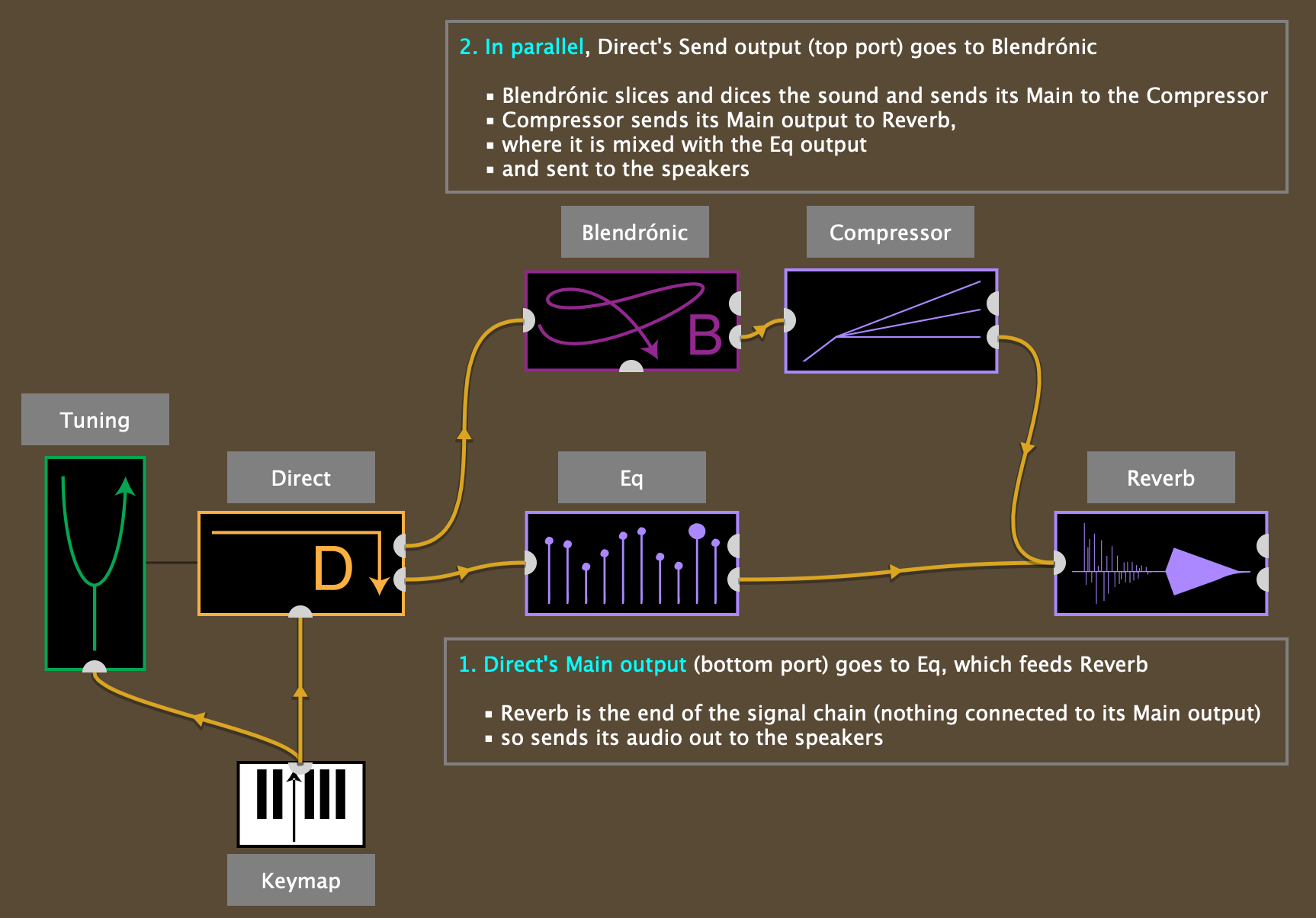
There is actually quite a bit to unpack here! Let’s start with the Direct preparation (just your basic piano sound, triggered by the keys in the Keymap attached from below, and tuned by the green Tuning attached from the left), which sends its sound to two places:
its port on the right side bottom (its “Main” output) goes to Eq, which then feeds a Reverb, and Reverb sends its sound out to the speakers.
its port on the right side top (its “Send” output) feeds a parallel chain, starting with a Blendrónic preparation that feeds a Compressor that then feeds the same Reverb at the end of the chain, where it is summed with the Eq output and sent to the speakers.
About those “ports:”
the right-side-bottom port is the Main output from the preparation.
if nothing is connected to it, then the preparation just sends its sound out to the speakers.
if it IS connected to something, it doesn’t send anything to the speakers, and sends its sound to wherever it is connected.
the right-side-top port is the Send output from the preparation.
this allows you to send the preparation’s sound to other preparations, without impacting whether its sound also goes out to the speaker (it affords parallel vs serial processing, akin to send buses in a DAW).
If we look inside the Direct preparation (below), we can see (on its right) two gain sliders that control how much of its sound is sent out the two ports; this is akin to a send knob and gain slider on a track in a DAW:
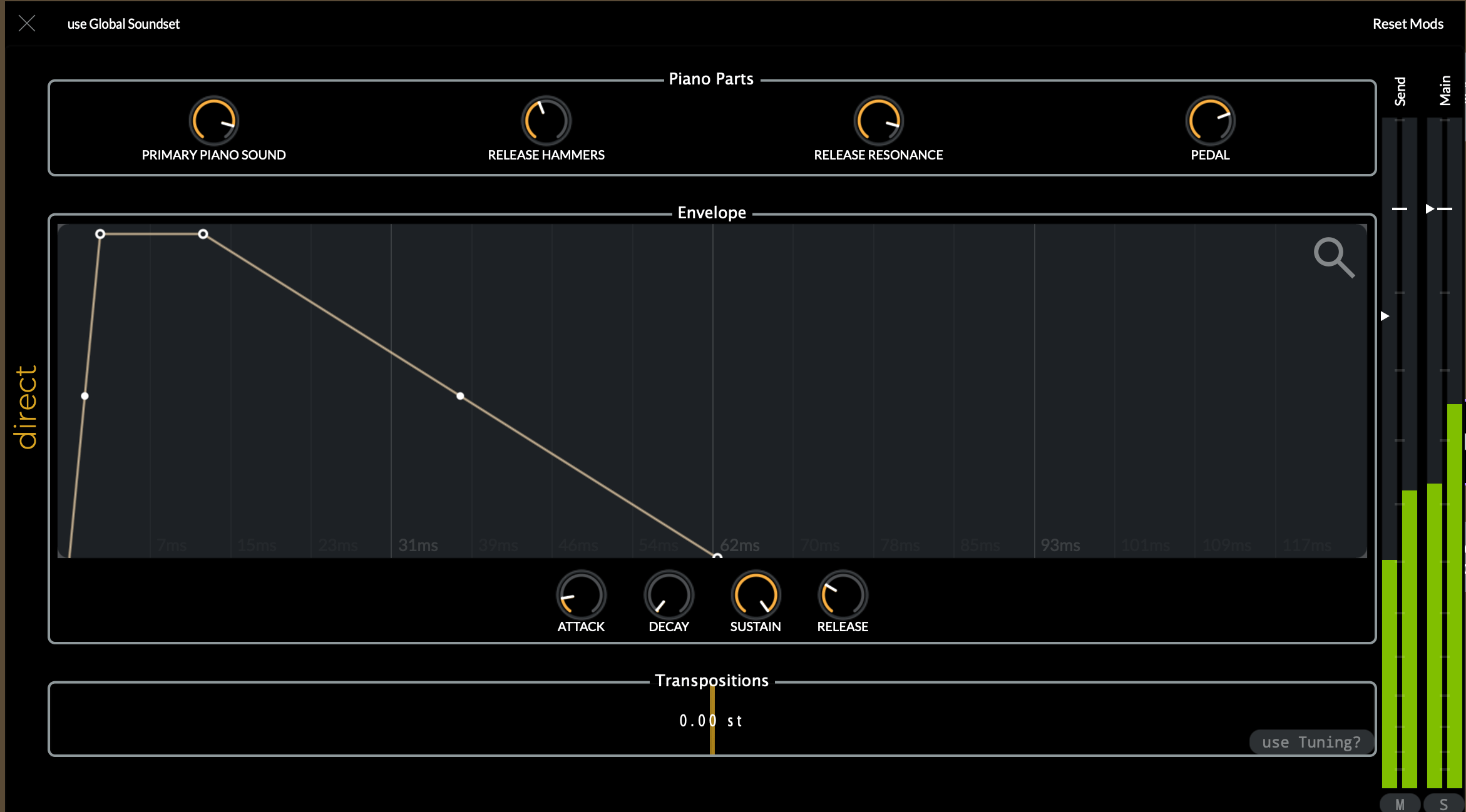
So, in this example, the only preparation that sends its sound out to the speakers is the Reverb preparation (nothing attached to its bottom, Main port, whereas all the other preparations have something connected to their Main outputs), and we can control independently how much signal goes to Blendrónic and to Eq from Direct.
None of this was possible before!
Prior users of bitKlavier will notice that these connections look different than in the past, with yellow directional cables (the little arrow-heads showing the direction) and black lines (connecting Direct to Tuning in this example):
yellow cables carry audio and MIDI signals, and are updated with every audio buffer (128 samples by default in bitKlavier); we call these signal connections.
in general, audio ports are on the left and right sides of preparations, whereas MIDI ports are on the bottom and top of the preparations (the Keymap feeding Direct in the example above carries MIDI, for instance).
the black line is simply a reference, making the preparations aware of one another, so here the Direct preparation can query the referenced Tuning whenever it needs information about how to tune a particular note; we call these referential connections.
these don’t use ports, and are made by simply dragging-dropping one preparation on the other (Tuning on to Direct, in this example).
This signal flow is more flexible than before, and allows for functionality that was impossible before. For instance, you can now connect a Modification to a Keymap to change the Keymap’s settings, which was impossible to represent in the old bitKlavier’s signal routing.
Speaking of Modifications….
Modifications are completely redone, and much more powerful
For me, one of the exciting things about bitKlavier has always been its ability to shape-shift, to change on that fly directly in response to what the player plays. The following will look familiar to experienced bitKlavier users:
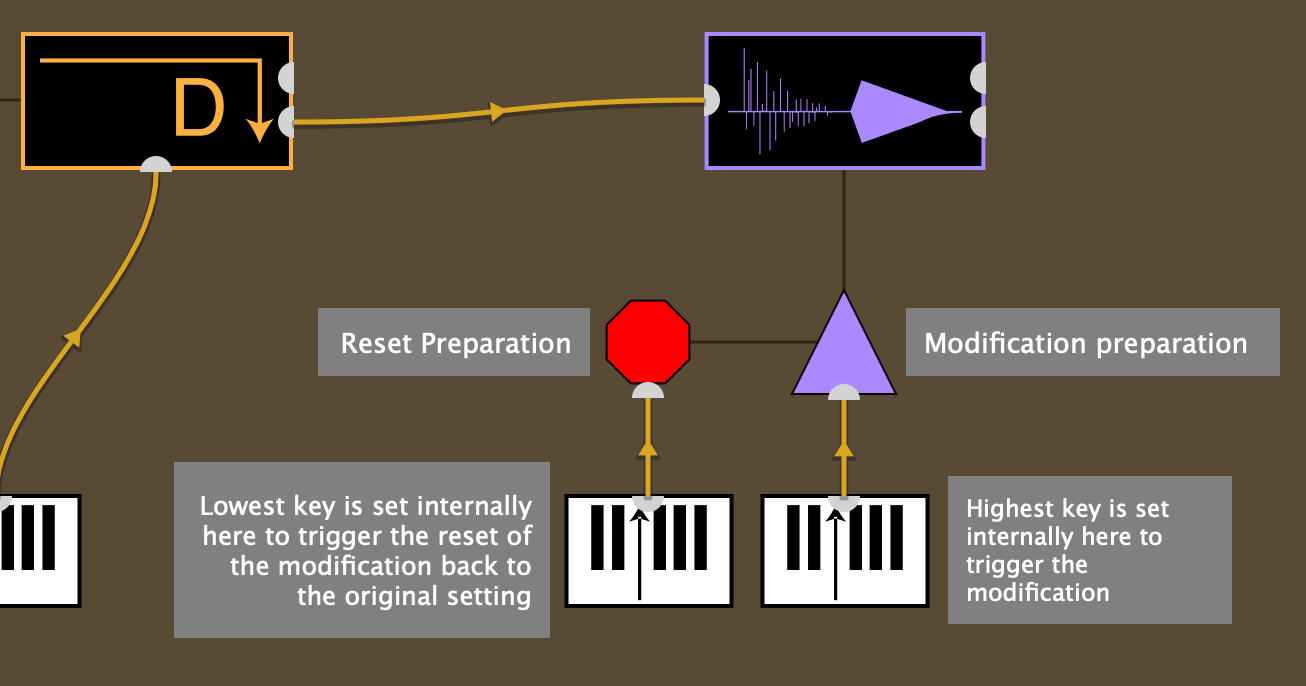
Here we have assigned a key in the Keymap (highest key, though we can’t see that from here, we’d need to open the Keymap preparation to look) to trigger a modification of the Reverb preparation, and another key (lowest key) to reset that modification back to its initial, saved setting. The details of the modification are found when opening the Modification and the Reverb parameter views:
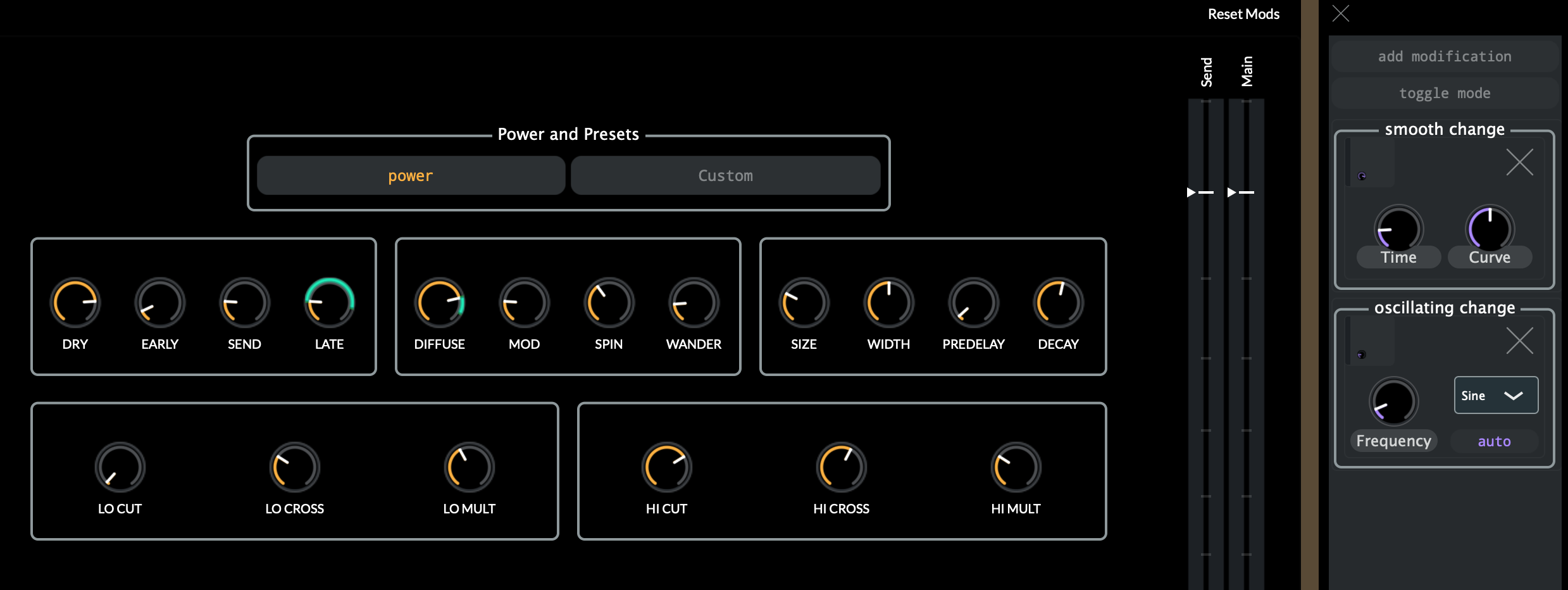
You need to mouse-over the parameters to see what is mapped to what (which are created by dragging-dropping modifications onto parameter knobs), but here we have a “smooth change” of the “late” parameter (the amount of the reverb tail) and an “oscillating change” (an LFO) connected to the “diffuse” parameter. The smooth change can be instantaneous, or take place over time, with some curvature. The LFO can be set to run continuously (“auto”) or turned on/off by the attached key, and has a variety of types. Here’s an animated gif, where:
I play the high note to start the modifications (we see the green sleeves move), then…
I release the key (which will stop the LFO on “diffuse”—the oscillating green sleeve freezes—while the “late” change continues, since it doesn’t care about noteOff),
and then play the low note to reset the values (the green sleeves go away):
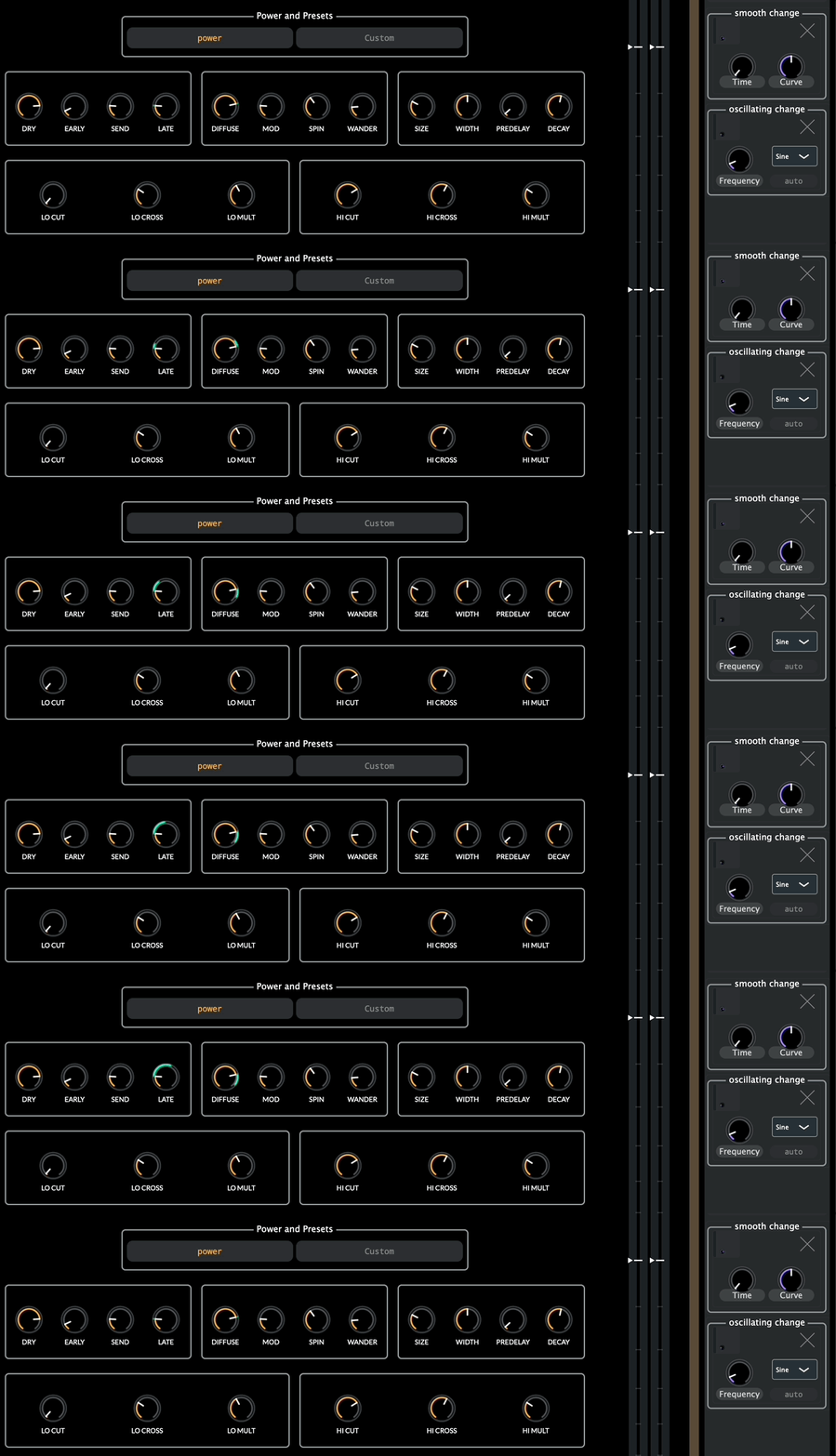
There are also state changes, where you can instantly change the settings of menu items (say, the tuning system) or multi-parameter elements (like a multislider with many values in Synchronic). There is lots of potential for this system, and I’m already imagining being able to create and trigger complex automation lines, inspired by Gulli Bjornsson’s work.
In some ways, bitKlavier is approaching being a DAW of sorts—with audio bussing and parameter automation—except from the design perspective of the piano rather than the mixing board/tape-deck.
A cleaner UI
The user interface is improved, with all the multiple panels condensed, making the preparations easier to understand and manipulate. Here is the Synchronic window, which used to require four separate windows:
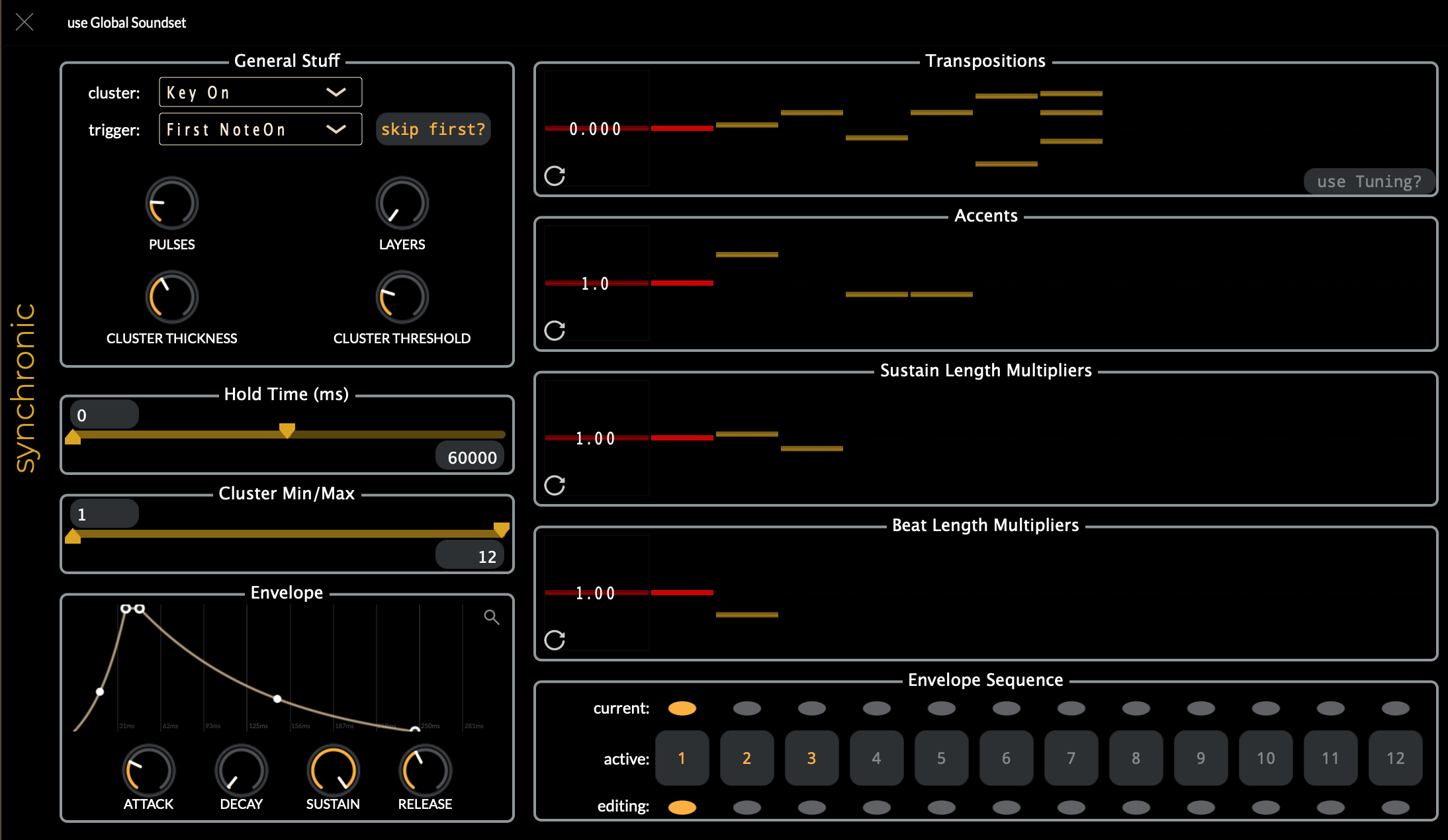
I’m finding my workflow much smoother with it now (the envelope sequencing in the old bitKlavier was particularly vexing; oh, and the envelope has curvature now as well, amazing what a difference that can make).
Bug fixes and preparation improvements (and new bugs!)
We managed to fix a lot of bugs in the old preparations, and make some major improvements to the Resonance preparation (which simulates sympathetic resonance of the piano in a flexible way); it’s a particularly CPU-intensive preparation, but is now multi-threaded, so it can maximize the use of multiple cores on Mac computers, and has graceful voice-handling, so it doesn’t just cut notes off when it runs out of voices.
Oh, and bitKlavier also takes audio input now! Blendrónic, for instance, can take input from a microphone/audio input, or the sidechain input when used as a plugin in a DAW. Much more to explore with this in the future as well….
Any Bad News with the Redux?
For sure. bitKlavier is now Mac only, no Windows/Linux/iOS, at least for the moment. I just don’t have the time to develop and support that! If someone is interested in working on a Windows and/or Linux build, please let me know; I don’t think there is anything inherently impossible about that with the new code, and it might be pretty easy, especially with some AI assistance. iOS is another matter, and I have no plans to revive the bitKlavier iOS project; it’s just too big and unwieldy an interface. Perhaps a “play-only” version will be possible at some point, if there is demand.
We’ve also done some feature pruning from the original, features that I’m not yet convinced we need and that make the program or interface more complicated and confusing (linked preparations). There are also a few things from the old one that just have not made it into the new one yet, but will (MTS-ESP support, for instance).
Have you really used the new version yet?
Indeed I have! I ported ALL the old pieces to the new version (there is a “import legacy gallery” function, which typically gets you 90% of the way there) and got them working, both in standalone and plugin (AU/VST3) modes, running in notation programs (Dorico and Sibelius) and DAWs like Logic and Ableton. Phew….
I also made a new piece, for the piano duo Tönky Hönk, that would have been impossible with the old version (and I made lots of updates/fixes to the program in the process). Actually, here’s a little video clip of Dorico playing the piece (as of this writing, Tönky Hönk hasn’t even seen the piece yet, surprise!):
OMG this piece has indeed been super fun to make!
What about future updates to bitKlavier?
I’m looking forward to a number of addition to bitKlavier:
MTS-ESP; for sharing bK’s dynamic Tuning with other plugins/applications that support MTS-ESP.
ChucKlavier; yes, a ChucK preparation, bitKlavier devouring its original maker! Will allow for countless explorations, extensions, and prototyping.
a Saturation preparation; because, we need saturation of course.
Munger preparation, with a bitKlavier design-focus; from my original munger~ object in Max/MSP, in PeRColate, which is a real-time granulator and still delightful to me, some 30 years after having originally written it.
DAW view; as I mentioned above, there are aspects of bitKlavier that resemble a DAW, and we think it would be useful to have a DAW-view available, where the signal flow in a gallery can be viewed and the gain-staging adjusted holistically in that familiar representation.
break-point parameter lines in Modifications, a la Gulli Bjornsson.
many smaller things.
ideas we get from y’all.
Who did all this?
bitKlavier was originally prototyped by me in ChucK and Max/MSP (it emerged directly from composing several pieces for Sō Percussion, Sideband, and others), and then Mike Mulshine and I wrote the first C++ version some nearly 10 years ago. Matt Wang carried the torch for a number of years, greatly expanding its capabilities. Davis Polito developed the software architecture for this redux version (a massive undertaking, and he did a brilliant job) and I have done most of the coding since he left Princeton in August 2025. Along the way, many other developers contributed to the project, including Theo Trevisan, Katie Chou, Jeff Gordon, Cami Streuly, and, most recently, Myra Norton; code from all those folks remains in the new version. We built the project using JUCE, and make heavy use of Jatin Chowdhury’s ChowDSP library. bitKlavier is an open-source project; here’s the repo if you want to check it out!